
Separate transcript collection from answering
Imagine a Q&A tool for a library of developer talks. Someone asks, “Which talk explains webhook retries?” The application first needs searchable text from the videos. It can collect that text with our youtube.transcript endpoint, then use its own embedding service and answer model to complete the feature.
Prepare a video when it enters the library. Store its transcript and passages once, then search those passages for each question. The second question about the same collection should reuse that work rather than trigger a fresh download of every transcript.
1. Fetch the transcript and keep its source
Submit a video URL and read data.text, data.language and data.source_url. Save the raw text before cleaning it. The request and response example below show the boundary between our API and your application: collection produces text; your ingestion worker adds document IDs, creates chunks and writes the index.
Set SOCIALSCRAPER_API_KEY on your backend and replace the example input with your source.
// YouTube Transcript API · youtube API
const response = await fetch("https://socialmediascraper.org/v1/youtube/transcript?url=https%3A%2F%2Fwww.youtube.com%2Fwatch%3Fv%3DbjVIDXPP7Uk", {
  method: 'GET',
  headers: {
    'x-api-key': process.env.SOCIALSCRAPER_API_KEY,
    'x-price-version': '2026-11-23.retail-1',
    'Idempotency-Key': crypto.randomUUID()
  }
});

if (!response.ok) throw new Error(`HTTP ${response.status}: ${await response.text()}`);
const data = await response.json();
console.log(data);{
"request_id": "example-request-id",
"data": {
"platform": "youtube",
"resource": "transcript",
"text": "Example transcript text for a public video.",
"language": "en",
"source_url": "https://example.com/public-content"
},
"meta": {
"platform": "youtube",
"fetched_at": "2026-11-28T00:00:00.000Z",
"cached": false,
"schema_version": "2026-11-23.2",
"route_version": 1,
"billing": {
"capability": "youtube.transcript",
"version": "2026-11-23.retail-1",
"currency": "USD",
"unit_scale": 1000000000,
"amount_units": 2444000,
"amount_usd": "0.002444000",
"billing_basis": "request"
}
}
}If you also need a video title or channel information, call youtube.post separately and attach the result to the same source. A transcript and a metadata record serve different parts of the product, so fetch the collections your feature actually displays.
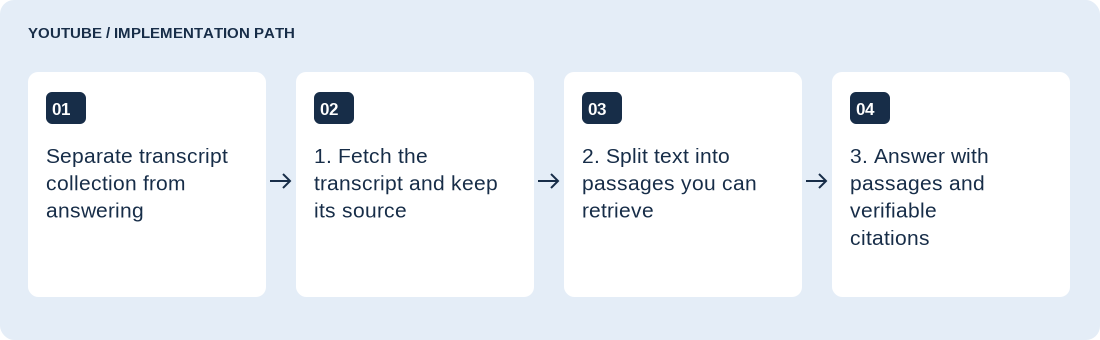
2. Split text into passages you can retrieve
Use passages large enough to keep an explanation together. Splitting “reuse the request key” away from the sentence describing a timeout can make both pieces hard to retrieve. Start with a simple word window, inspect a few boundaries and add sentence-aware splitting if the examples show that you need it.
| Stored field | Example purpose | Why it matters |
|---|---|---|
| id | Video ID plus passage number | Update or replace a specific passage |
| text | The passage being searched | Supply evidence to the answer model |
| source_url | The video link | Render a citation users can open |
| language | The returned language | Filter multilingual collections |
Only attach a start time if the returned source contains timing that matches the passage. Plain transcript text can support an answer and a video citation; it does not establish a precise player timestamp.
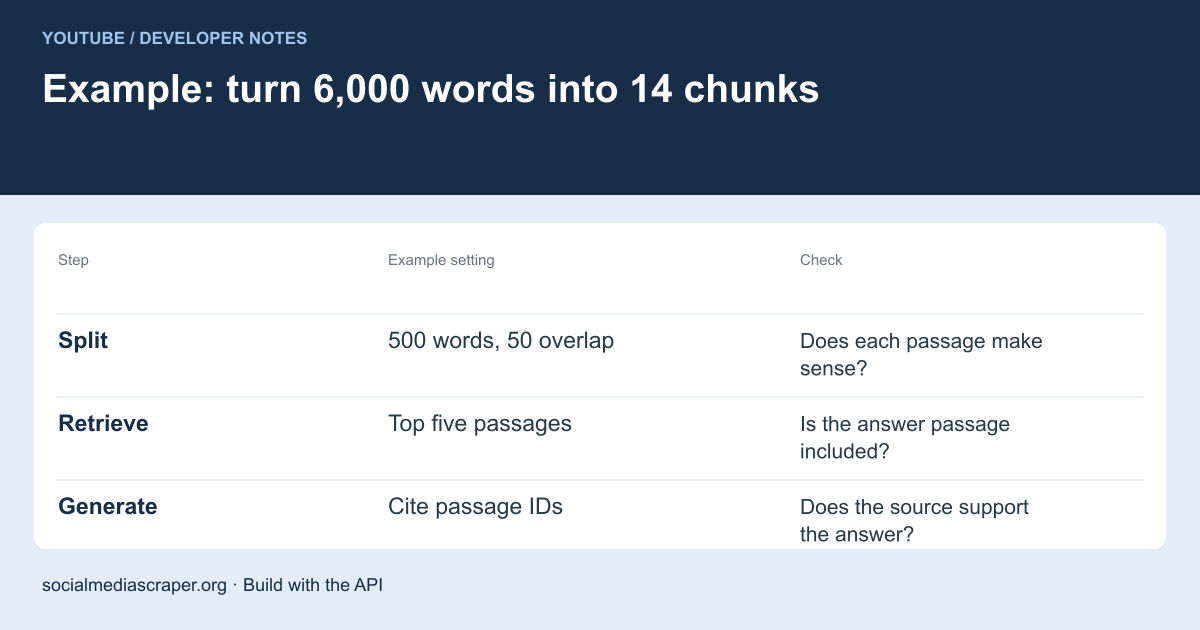
Example: turn 6,000 words into 14 chunks
For a 6,000-word transcript, a 500-word window with 50 words of overlap advances 450 words at a time. Stopping when a window reaches the end produces 14 chunks. The function below implements that exact rule, returns each passage with its source and rejects invalid settings.
function chunkTranscript(transcript, videoId, size = 500, overlap = 50) {
  if (!Number.isInteger(size) || size < 1 ||
      !Number.isInteger(overlap) || overlap < 0 || overlap >= size) {
    throw new Error("Choose size > 0 and 0 <= overlap < size");
  }
  if (!videoId) throw new Error("A source video ID is required");
  const words = (transcript.text ?? "").trim().split(/\s+/).filter(Boolean);
  const chunks = [];
  for (let start = 0; start < words.length; start += size - overlap) {
    const end = Math.min(start + size, words.length);
    chunks.push({
      id: `${videoId}:${chunks.length}`,
      text: words.slice(start, end).join(" "),
      source_url: transcript.source_url,
      language: transcript.language ?? null
    });
    if (end === words.length) break;
  }
  return chunks;
}
This example counts whitespace-separated words, not model tokens, and is intended for text with word boundaries such as English. To evaluate it, write ten questions and mark the source passage answering each one. If eight answer passages appear in the top five retrieved results, the sample hit rate is 8/10. Investigate the two misses before changing the answer prompt.
| Step | Example setting | Check |
|---|---|---|
| Split | 500 words, 50 overlap | Does each passage make sense? |
| Retrieve | Top five passages | Is the answer passage included? |
| Generate | Cite passage IDs | Does the source support the answer? |
3. Answer with passages and verifiable citations
For each question, search the selected collection and send the relevant passages to the model with stable passage IDs. Ask the model to cite those IDs, then let your interface resolve them to URLs already stored in your database. This keeps the answer and its links connected to the same collected evidence.
{
  "question": "How should webhook retries be handled?",
  "passages": [
    {
      "id": "talk-01:3",
      "text": "The retrieved passage goes here",
      "source_url": "https://www.youtube.com/watch?v=VIDEO_ID"
    }
  ],
  "citation_ids": [
    "talk-01:3"
  ]
}
When an answer is wrong, first inspect which passages reached the model. If the correct passage was absent, fix retrieval. If it was present, check the generated claim and citation. Separating these checks makes the feature easier to improve than treating every wrong answer as a prompt problem.
Add videos without rebuilding unchanged text
Save a hash of each transcript. When a refresh returns the same text, keep the existing chunks and vectors; when it changes, replace that video’s chunks together. Record the collection date separately from the video’s publication date so you can explain when the source was last checked.
Start with one video and one cited answer. Once that works, add more sources and measure the two budgets separately: transcript retrieval and embeddings during ingestion, then model generation for each question. Our Transcript API and Python tutorial cover the collection step so you can focus on retrieval and the answer experience.
FAQ
Common questions
A few details to check before you build.
What does socialmediascraper.org do in a RAG application?
It retrieves supported video transcripts and other public source data. Your application splits the text, creates embeddings, retrieves passages and calls the answer model.
Do I need to fetch the transcript for every question?
No. Store prepared text and reuse it according to your refresh policy. New questions can search the same index without another transcript request.
Can I link an answer to a timestamp?
Only when your returned transcript source contains timing that can be mapped to the cited passage. Otherwise cite the video URL and the supporting text.
Where should I start?
Try one video with the YouTube Transcript API, then use the linked Python tutorial to save the text. Build a single cited answer before adding a larger collection.
API references, tutorials and sources

socialmediascraper.org team
API guides and practical examples by the socialmediascraper.org team.