
Retrieve spoken text for the video you selected
For a video-summary or search feature, the title and description are not enough: you need the spoken text. Our Transcript API accepts a video URL and returns the text fields your backend can store and process. Summarizing, indexing and answering questions happen in your application after that request.
Begin with a single source you want to use. Check that the returned text is usable, save its video link and decide what the next screen should do with it. Video metadata is a separate lookup if you also need a title or channel name for display.
1. Request and save the transcript
Create an API key, set SOCIALSCRAPER_API_KEY on your backend and replace the sample video URL. The request below checks the HTTP status before parsing the response. Inspect the returned data before adding a queue or connecting an AI model.
Set SOCIALSCRAPER_API_KEY on your backend and replace the example input with your source.
// YouTube Transcript API · youtube API
const response = await fetch("https://socialmediascraper.org/v1/youtube/transcript?url=https%3A%2F%2Fwww.youtube.com%2Fwatch%3Fv%3DbjVIDXPP7Uk", {
  method: 'GET',
  headers: {
    'x-api-key': process.env.SOCIALSCRAPER_API_KEY,
    'x-price-version': '2026-11-23.retail-1',
    'Idempotency-Key': crypto.randomUUID()
  }
});

if (!response.ok) throw new Error(`HTTP ${response.status}: ${await response.text()}`);
const data = await response.json();
console.log(data);{
"request_id": "example-request-id",
"data": {
"platform": "youtube",
"resource": "transcript",
"text": "Example transcript text for a public video.",
"language": "en",
"source_url": "https://example.com/public-content"
},
"meta": {
"platform": "youtube",
"fetched_at": "2026-11-28T00:00:00.000Z",
"cached": false,
"schema_version": "2026-11-23.2",
"route_version": 1,
"billing": {
"capability": "youtube.transcript",
"version": "2026-11-23.retail-1",
"currency": "USD",
"unit_scale": 1000000000,
"amount_units": 2444000,
"amount_usd": "0.002444000",
"billing_basis": "request"
}
}
}Save the text and its source together. The file-writing example below keeps the returned text fields and request ID in a JSON file, ready for your own processing. An empty or unavailable text result should remain a distinct outcome rather than becoming an empty document in your search index.
import { writeFile } from "node:fs/promises";

async function saveTranscript(payload, path = "transcript.json") {
  const transcript = payload.data;
  if (!transcript?.text?.trim()) throw new Error("No usable transcript text");
  const record = {
    request_id: payload.request_id,
    text: transcript.text,
    language: transcript.language ?? null,
    source_url: transcript.source_url
  };
  await writeFile(path, JSON.stringify(record, null, 2), "utf8");
  return record;
}
// Pass the JSON body returned by the transcript request to this function.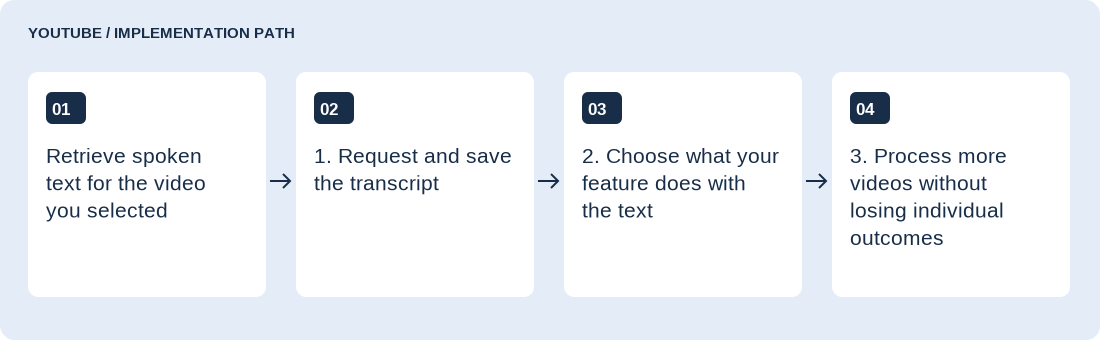
2. Choose what your feature does with the text
For a summary, pass the relevant text to your model and keep the source beside its answer. For search, index coherent passages with the video URL. A RAG collection also needs your own document and collection IDs so a question searches only the intended sources.
| Feature | What to do with the text | What to keep |
|---|---|---|
| Summary | Send relevant text to your model | Source URL and supporting passage |
| Transcript search | Index short passages | Passage ID and video source |
| RAG application | Embed and retrieve passages | Collection ID and citations |
| Subtitle-style player | Use timing when returned | Actual source timing, if available |
Keep an unmodified copy before cleaning repeated lines or formatting. The cleaned version can feed the application, while the original gives you a way to investigate missing phrases or rebuild the index after changing a parser.
3. Process more videos without losing individual outcomes
For a list of URLs, keep one work item and one result per video. When starting from a channel, use the channel-video endpoint to discover sources, select the videos your feature needs and request their transcripts individually. A failed source should not discard the other videos already collected.
Limit how many videos a run can process and prioritize new or user-selected sources. Store successful transcripts for reuse, so several questions about the same video do not each become another collection job. Your model calls and transcript requests can then have separate product allowances.
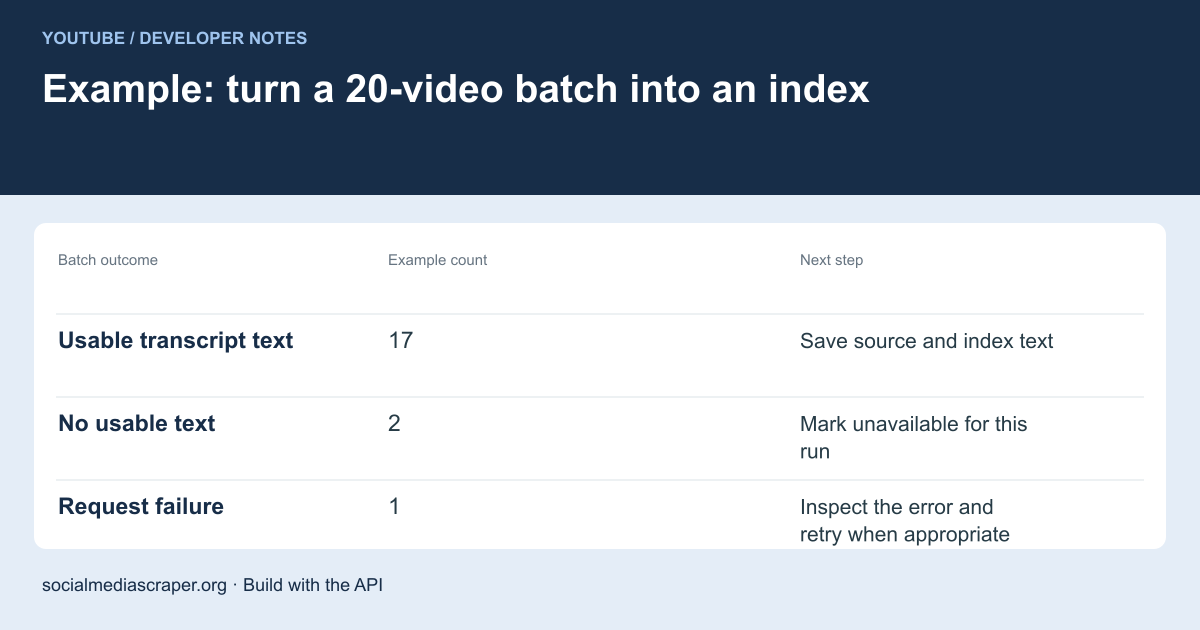
Example: turn a 20-video batch into an index
Suppose a planned batch has 20 videos: 17 yield usable text, two return no usable text and one request fails. Index the 17 usable transcripts and retain outcomes for the other three. The batch report should show what remains rather than counting every attempted URL as an indexed video.
Store the requested language separately from the language actually returned. If your feature needs timed passages, check that the response supplies matching timing. Plain text is still useful for summaries and search, but it should not be presented as sentence-level timestamps.
| Batch outcome | Example count | Next step |
|---|---|---|
| Usable transcript text | 17 | Save source and index text |
| No usable text | 2 | Mark unavailable for this run |
| Request failure | 1 | Inspect the error and retry when appropriate |
Choose the next step: a saved transcript or a video feature
If you need the transcript itself, the request and file-writing example are enough to start saving results. Our Python tutorial provides a complete client for the same operation. If you are building video Q&A, continue with the RAG guide for chunking, retrieval and citations.
Keep transcript requests separate from later model calls in your budget. One saved transcript can serve several summaries or questions, while model usage depends on those interactions. Add video details, comments or channel discovery through our API only when the next feature needs that data.
FAQ
Common questions
A few details to check before you build.
How do I get a transcript from a YouTube URL?
Submit the URL to socialmediascraper.org’s youtube.transcript operation and read the text, language and source URL in data. The operation reference and Python tutorial show the exact request.
Does this endpoint generate the video summary?
It retrieves source text. Your application passes that text to its chosen model to generate a summary, then attaches the video link and supporting passage.
Can I process a list or a channel?
Use a queue to request each selected video independently. For channel-based discovery, get the video records first, then collect transcripts for the videos your product selects.
Is the official caption download the same workflow?
No. Google’s captions.download requires authorization from a user with permission to edit the video. Evaluate socialmediascraper.org’s transcript operation for its documented supported public-video workflow.
API references, tutorials and sources

socialmediascraper.org team
API guides and practical examples by the socialmediascraper.org team.