
What you get from a comment request
The endpoint returns a page of comment records your backend can search, display or classify. This is the data behind a feedback feature: individual text entries, IDs and available author or metric fields. A video’s total comment count can help choose a source, but it cannot answer what people said.
For a first version, submit one video and display the returned comments beside the original video link. Then add the action your product needs, such as finding repeated questions. Keeping collection and analysis separate lets you improve the feature without rewriting the data client.
1. Request the first comment page
Create an API key in our dashboard and set SOCIALSCRAPER_API_KEY in your server environment. Replace the sample video URL and run the request below. Keep the API key on the backend; your browser interface should call your application server rather than expose the service credential.
Set SOCIALSCRAPER_API_KEY on your backend and replace the example input with your source.
// TikTok Video Comments API · tiktok API
const response = await fetch("https://socialmediascraper.org/v1/tiktok/comments?url=https%3A%2F%2Fwww.tiktok.com%2Fexample", {
  method: 'GET',
  headers: {
    'x-api-key': process.env.SOCIALSCRAPER_API_KEY,
    'x-price-version': '2026-11-23.retail-1',
    'Idempotency-Key': crypto.randomUUID()
  }
});

if (!response.ok) throw new Error(`HTTP ${response.status}: ${await response.text()}`);
const data = await response.json();
console.log(data);
The example checks the HTTP status before reading JSON. Save request_id with the page, along with the request key if you need to investigate an uncertain result. Reuse the same key and inputs for a retry; use a new key for another page or a different video.
Get your socialmediascraper.org API key
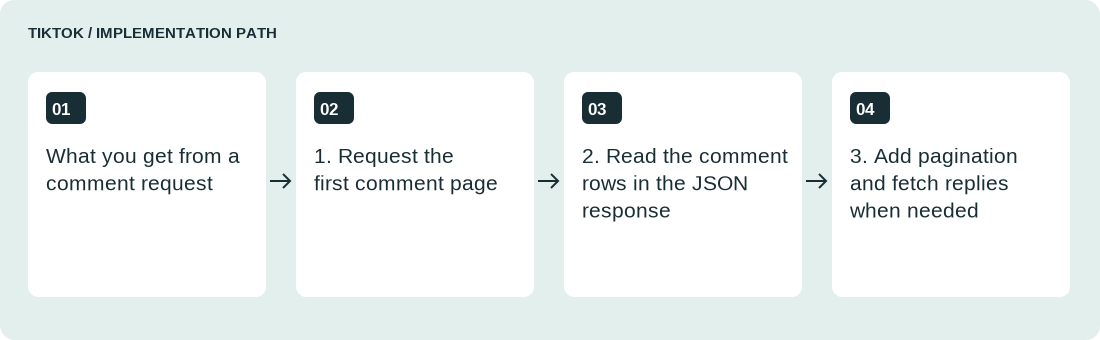
2. Read the comment rows in the JSON response
In the response, data.items contains the returned rows and data.cursor is the continuation value. Store each comment’s id and text together with the source video URL you submitted. Optional fields can be null, so build the first parser around the fields your screen actually needs.
{
  "request_id": "example-request-id",
  "data": {
    "platform": "tiktok",
    "resource": "comments",
    "items": [
      {
        "id": "123456789",
        "position": 0,
        "url": "https://example.com/public-content",
        "title": "Example public content",
        "text": "Example public content",
        "published_at": null,
        "author": {
          "id": "123456789",
          "handle": "example",
          "display_name": "Example creator"
        },
        "metrics": {
          "views": null,
          "likes": 12,
          "comments": null,
          "shares": null
        }
      }
    ],
    "cursor": null
  },
  "meta": {
    "platform": "tiktok",
    "fetched_at": "2026-11-28T00:00:00.000Z",
    "cached": false,
    "schema_version": "2026-11-23.2",
    "route_version": 1,
    "billing": {
      "capability": "tiktok.comments",
      "version": "2026-11-23.retail-1",
      "currency": "USD",
      "unit_scale": 1000000000,
      "amount_units": 2444000,
      "amount_usd": "0.002444000",
      "billing_basis": "request"
    }
  }
}| Field | Use in your app | Storage choice |
|---|---|---|
| data.items[].id | Identify a comment | Unique key within TikTok |
| data.items[].text | Search or classify feedback | Original source text |
| data.cursor | Request another page | Save as returned |
| request_id | Investigate a request | Keep with the collected page |
3. Add pagination and fetch replies when needed
Pass the returned cursor through the pagination input documented for tiktok.comments, keeping the video URL fixed. Stop when there is no next cursor, when one repeats or when your page budget is reached. Your loop should save a page before advancing its checkpoint.
Use tiktok.video_comment_replies when your feature needs replies beneath a selected comment. Follow that operation’s required identifiers and save the parent comment you requested alongside its returned replies. This is a separate collection step, not text hidden inside a reply-count field.
function mergeCommentPages(pages) {
  const comments = new Map();
  for (const page of pages) {
    for (const item of page.data?.items ?? []) {
      if (item.id) comments.set(item.id, item);
    }
  }
  return [...comments.values()];
}
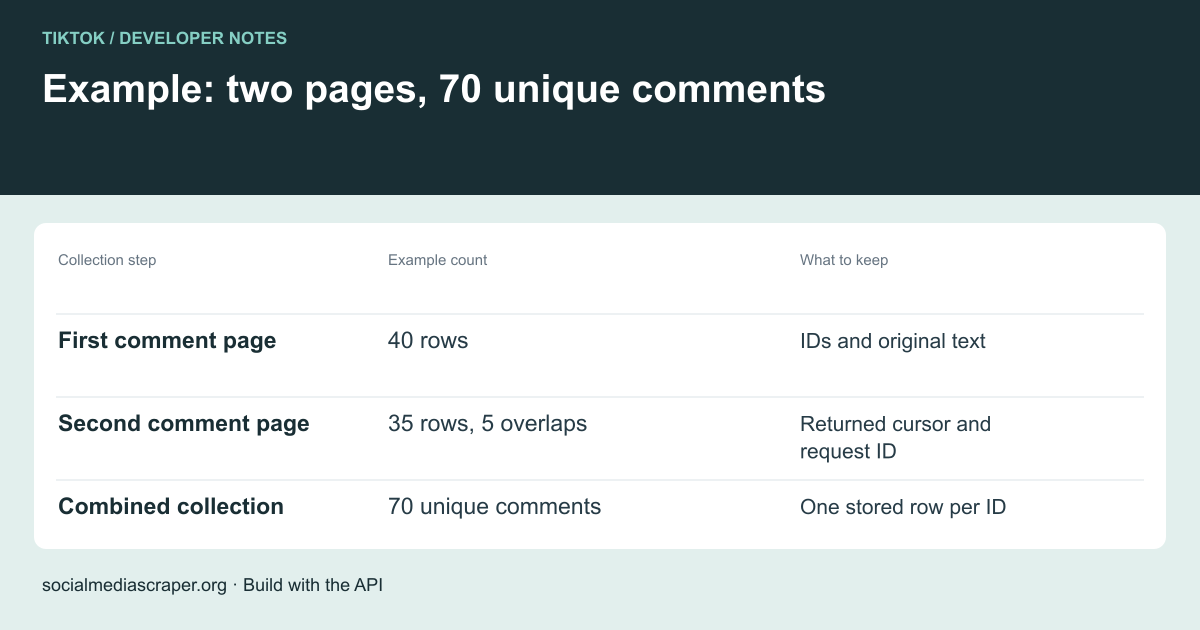
Example: two pages, 70 unique comments
Suppose page one returns 40 rows and page two returns 35, with five IDs in both. Merge them into 70 unique comments. The function above takes several response pages and returns one record per comment ID; a database unique key extends the same rule to later refreshes.
A run for ten videos with a limit of three comment pages each needs up to 30 comment requests. Fetching replies or video details adds separate operations. Keep those allowances explicit so a highly active discussion does not consume a budget meant for the whole video set.
| Collection step | Example count | What to keep |
|---|---|---|
| First comment page | 40 rows | IDs and original text |
| Second comment page | 35 rows, 5 overlaps | Returned cursor and request ID |
| Combined collection | 70 unique comments | One stored row per ID |
Add a useful action to the collected comments
Once the page loop works, build one result your customers can use: a searchable comment table, a list of repeated questions or a set of feedback themes. Store generated labels separately from original text so another classifier can reuse the same comments.
Start with the Comments API reference and one source video. Our Python tutorial provides the complete operation-specific client, while the related TikTok endpoints add profile or video context when the product needs it. You can keep the collection integration the same as the feature expands.
FAQ
Common questions
A few details to check before you build.
Does the comments endpoint return comment text?
Yes. Read the returned items for comment records, including text and the available fields shown in the operation reference. A video’s total comment count is a different field and does not replace fetching the comments.
How do I request more comments?
Use the response cursor with the endpoint’s documented pagination input. Keep the video target unchanged and stop when no continuation is returned or your page limit is reached.
Can I collect replies?
Use the separate TikTok comment-replies operation with its documented identifiers. Save the parent comment you requested so the returned replies stay attached to their discussion.
Is one comment the same as one paid request?
No. The operation returns a page of records. Check the current operation price and count pages and reply requests when estimating a job.
API references, tutorials and sources

socialmediascraper.org team
API guides and practical examples by the socialmediascraper.org team.