
Collect a video feed your application can update
An account tracker needs video records it can compare across runs. Our tiktok.profile_videos endpoint returns a collection for the handle you submit. Your backend can store those items, render a feed and identify which returned IDs it has already seen.
Decide what the feed needs before adding other requests. A content dashboard may only need the listing and source URLs; selected videos can later receive details, comments or transcripts. Saving playable video files is a separate transfer and storage task, not a result of inserting listing rows in a database.
1. Request the first video page
Set SOCIALSCRAPER_API_KEY in your backend and send the account’s handle. Keep each item’s ID and URL from data.items, and record which account the collection belongs to. The example below shows the first request and the response structure your parser consumes.
Set SOCIALSCRAPER_API_KEY on your backend and replace the example input with your source.
// TikTok Profile Videos API · tiktok API
const response = await fetch("https://socialmediascraper.org/v1/tiktok/profile_videos?handle=stoolpresidente", {
  method: 'GET',
  headers: {
    'x-api-key': process.env.SOCIALSCRAPER_API_KEY,
    'x-price-version': '2026-11-23.retail-1',
    'Idempotency-Key': crypto.randomUUID()
  }
});

if (!response.ok) throw new Error(`HTTP ${response.status}: ${await response.text()}`);
const data = await response.json();
console.log(data);{
"request_id": "example-request-id",
"data": {
"platform": "tiktok",
"resource": "profile_videos",
"items": [
{
"id": "123456789",
"position": 0,
"url": "https://example.com/public-content",
"title": "Example public content",
"text": "Example public content",
"published_at": null,
"author": {
"id": "123456789",
"handle": "example",
"display_name": "Example creator"
},
"metrics": {
"views": null,
"likes": 12,
"comments": null,
"shares": null
}
}
],
"cursor": null
},
"meta": {
"platform": "tiktok",
"fetched_at": "2026-11-28T00:00:00.000Z",
"cached": false,
"schema_version": "2026-11-23.2",
"route_version": 1,
"billing": {
"capability": "tiktok.profile_videos",
"version": "2026-11-23.retail-1",
"currency": "USD",
"unit_scale": 1000000000,
"amount_units": 2444000,
"amount_usd": "0.002444000",
"billing_basis": "request"
}
}
}Keep the collection time as well as any returned publication time. A video published last month can be observed by your tracker today; those dates answer different questions. Your interface can then distinguish “newly discovered by this tracker” from “newly published.”
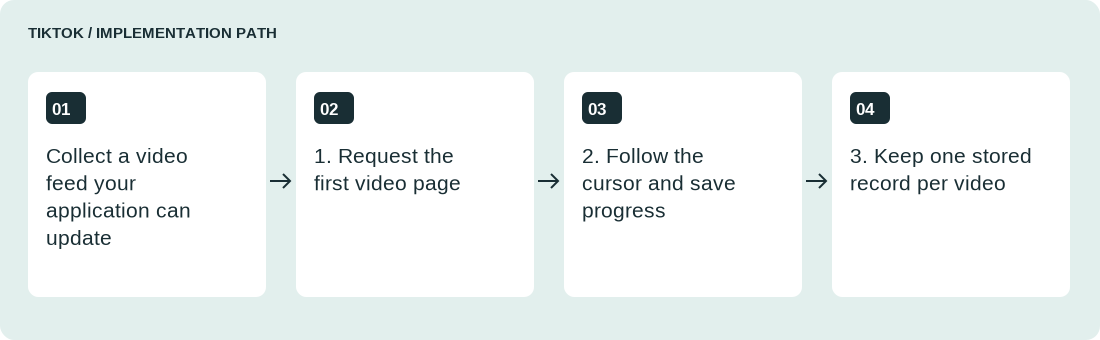
2. Follow the cursor and save progress
For this endpoint, the continuation input is max_cursor. When the response supplies data.cursor, pass that value as max_cursor on the next request and keep the handle unchanged. Other operations use different parameter names, so do not copy the comments endpoint’s cursor input into the video-listing call.
Stop when no continuation is returned, when a cursor repeats or when the page allowance is reached. Save the completed page before its next checkpoint. Record the run’s account, filters and page count so a later process can resume the same collection instead of mixing different result chains.
{
  "account_handle": "example",
  "max_cursor": "CURSOR_FROM_RESPONSE",
  "saved_pages": 3,
  "run_status": "paused"
}
3. Keep one stored record per video
Use the video ID as the upsert key. A video seen again on a refresh is an updated observation, not a new publication. Keep a metrics history only if the feature needs trends; otherwise retain the latest record and its collection date.
Use TikTok profile details when the dashboard also needs the account card, and add video details or comments for selected content. These related API operations let you expand a basic feed into a research product without collecting every possible field on every refresh.
Example: refresh 25 accounts with a three-page cap
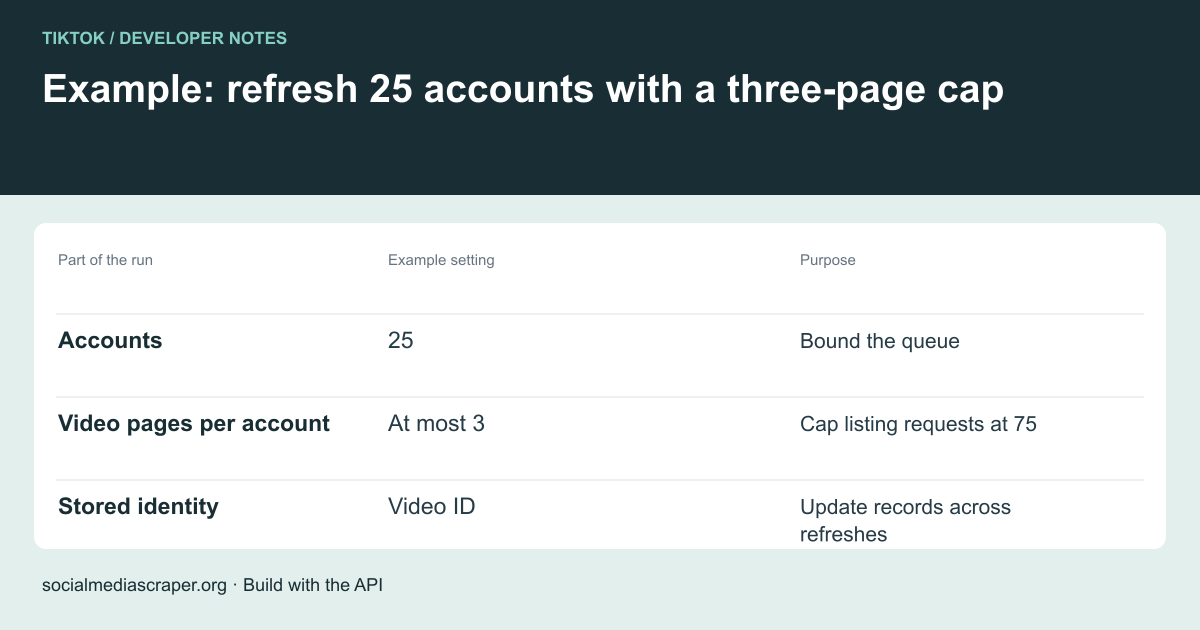
A run for 25 accounts with at most three video pages each needs no more than 75 new listing requests. Accounts that finish earlier use fewer pages. Profile lookups, comments and transcripts are additional work, so count those separately instead of assuming the listing also supplies them.
Keep a checkpoint for each account rather than one global cursor. Your scheduler can then continue the account that paused, refresh a more active account or defer deeper history. This makes collection fit the product’s budget instead of letting the longest account control the whole run.
| Part of the run | Example setting | Purpose |
|---|---|---|
| Accounts | 25 | Bound the queue |
| Video pages per account | At most 3 | Cap listing requests at 75 |
| Stored identity | Video ID | Update records across refreshes |
Use the account-access model that fits the feature
For public-account research, our Profile Videos API accepts a handle. TikTok’s official video-list method instead documents a TikTok user authorization token and the video.list scope. The two request formats are different; choose the one matching the accounts your product is authorized and designed to process.
| Your feature | Starting point | Next step |
|---|---|---|
| Public-account video research | socialmediascraper.org Profile Videos API | Submit the account handle |
| Display an authorized user’s videos | TikTok’s official video-list method | Follow TikTok authorization requirements |
| Add feedback to selected videos | socialmediascraper.org comments operations | Collect the discussion separately |
Start with one handle and a bounded number of pages, then save IDs and the max_cursor checkpoint. The Python tutorial provides the complete operation-specific request. Add scheduled refreshes once the feed is useful, and describe the observed page range rather than promising a complete account archive from a single run.
FAQ
Common questions
A few details to check before you build.
Does this API return a list of account videos?
Yes. Use tiktok.profile_videos with the account handle and read the video items in the response. Follow the documented cursor input for additional pages.
Can I use it to maintain a tracker?
Yes. Run the listing again on your schedule, upsert by video ID and keep the collection date. For this endpoint, send the response continuation through max_cursor. Keep a page budget and a checkpoint for each account.
Does listing a video save its media file?
No. The listing supplies records for your application. Transferring and storing playable media is a separate workflow that should check the actual media output.
Can I add comments to the tracker?
Use the TikTok comments and reply operations for selected videos. Count that collection separately from the video-listing pages.
API references, tutorials and sources

socialmediascraper.org team
API guides and practical examples by the socialmediascraper.org team.