
Use a known handle to populate a profile card
A user submits an Instagram handle to your app. Your backend requests that profile, then displays a name, biography, profile link and follower count when available. That is enough for a useful contact or creator card without first collecting the account’s posts.
This endpoint looks up an account you can identify. A category such as “camping creators” is not a replacement for a handle. Start with usernames supplied by a user or an imported list, then use our profile operation to fill in the public account details.
1. Make a profile request from your backend
Set SOCIALSCRAPER_API_KEY on your server, replace the sample handle and run the JavaScript request below. A browser form can submit the handle to your own backend, which makes the data request and applies the allowances you set for your users.
Set SOCIALSCRAPER_API_KEY on your backend and replace the example input with your source.
// Instagram Profile API · instagram API
const response = await fetch("https://socialmediascraper.org/v1/instagram/profile?handle=jane", {
  method: 'GET',
  headers: {
    'x-api-key': process.env.SOCIALSCRAPER_API_KEY,
    'x-price-version': '2026-11-23.retail-1',
    'Idempotency-Key': crypto.randomUUID()
  }
});

if (!response.ok) throw new Error(`HTTP ${response.status}: ${await response.text()}`);
const data = await response.json();
console.log(data);
Check the HTTP status before saving the result. For an invalid handle or another validation error, correct the input rather than repeating it unchanged. On success, save request_id with the lookup so you can trace the account record back to its request.
Create a socialmediascraper.org API key
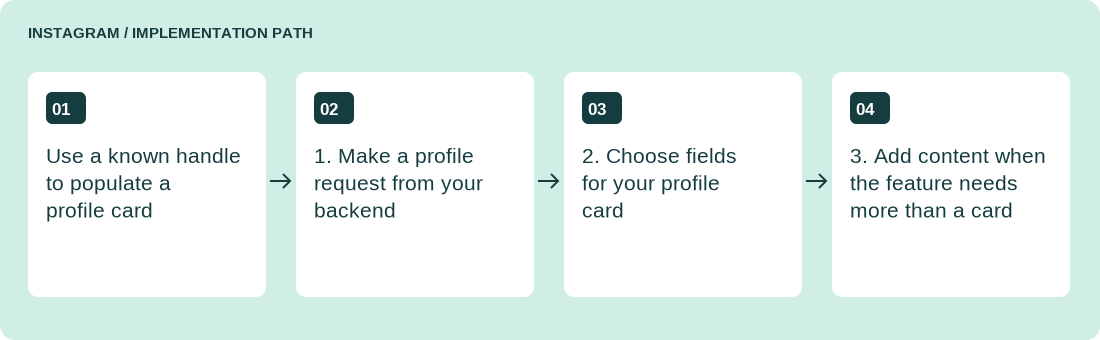
2. Choose fields for your profile card
The response stores the account under data. Use data.id as the database key, data.handle as the current username and data.profile_url as the link a user opens. The mapping example after the table creates a small card object from these fields while preserving a missing follower count as null.
{
  "request_id": "example-request-id",
  "data": {
    "platform": "instagram",
    "resource": "profile",
    "id": "123456789",
    "handle": "example",
    "display_name": "Example creator",
    "bio": "Example biography",
    "profile_url": "https://www.instagram.com/example/",
    "avatar_url": null,
    "verified": null,
    "private": null,
    "metrics": {
      "followers": 1200,
      "following": null,
      "posts": null,
      "likes": null,
      "views": null
    }
  },
  "meta": {
    "platform": "instagram",
    "fetched_at": "2026-11-28T00:00:00.000Z",
    "cached": false,
    "schema_version": "2026-11-23.2",
    "route_version": 1,
    "billing": {
      "capability": "instagram.profile",
      "version": "2026-11-23.retail-1",
      "currency": "USD",
      "unit_scale": 1000000000,
      "amount_units": 2444000,
      "amount_usd": "0.002444000",
      "billing_basis": "request"
    }
  }
}| Field | Product use | Keep in mind |
|---|---|---|
| data.id | Update the same account later | Use as the stored account key |
| data.handle | Display the username | A handle can change |
| data.bio | Show profile context | Preserve the returned text |
| data.metrics.followers | Filter or display a count | Keep unavailable values as null |
function toProfileCard(payload) {
  const profile = payload.data;
  return {
    id: profile.id,
    handle: profile.handle,
    name: profile.display_name ?? profile.handle,
    bio: profile.bio ?? "",
    source_url: profile.profile_url,
    followers: profile.metrics?.followers ?? null
  };
}
3. Add content when the feature needs more than a card
A contact card may only need the profile. A creator-research screen also needs posts or Reels to explain what the account publishes. Request those through instagram.posts or instagram.reels and connect the returned content to the account already stored in your application.
You can render the card before fetching those extra collections. For an imported list, save the profiles first and let a background task add content to the accounts selected for deeper review. This keeps a simple lookup from waiting on requests the current screen does not use.
Example: preserve a missing follower observation
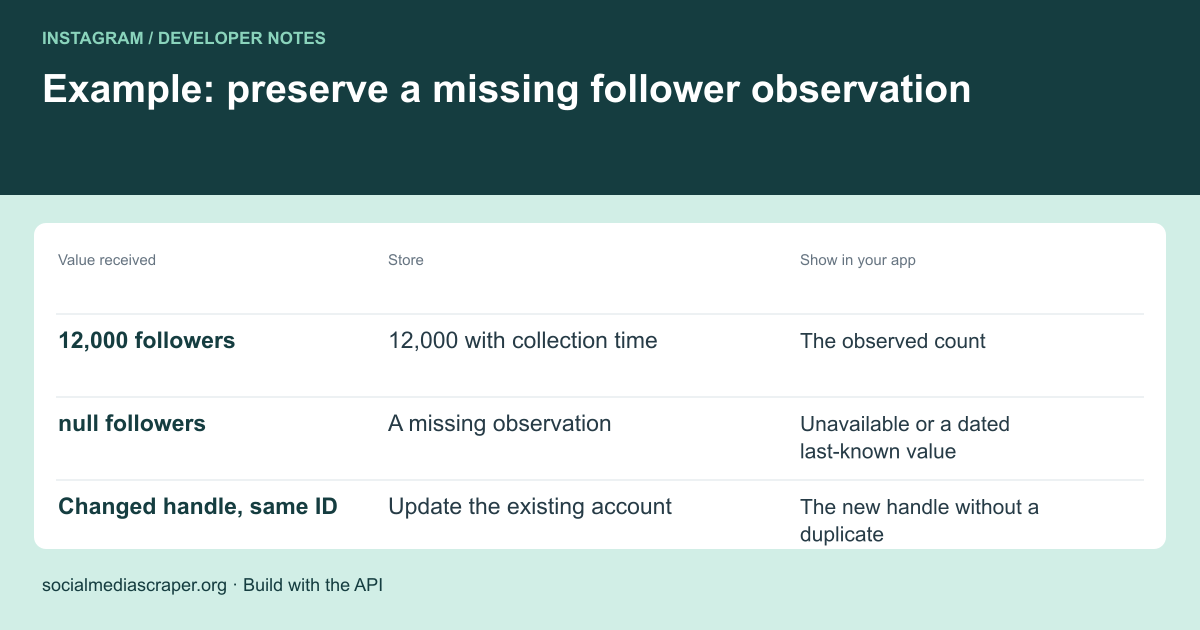
Suppose Monday’s response shows 12,000 followers and Tuesday’s has null for that metric. Tuesday is a missing observation, not a drop to zero. Store that distinction so a chart does not invent a 12,000-follower loss or present Monday’s value as a fresh Tuesday measurement.
If you display the last known count, show its date. In storage, keep the account identity separate from dated metrics. This lets our API refreshes feed a history chart while the current handle and profile link remain on the account record.
| Value received | Store | Show in your app |
|---|---|---|
| 12,000 followers | 12,000 with collection time | The observed count |
| null followers | A missing observation | Unavailable or a dated last-known value |
| Changed handle, same ID | Update the existing account | The new handle without a duplicate |
Refresh the records your users actually need
Record when the profile was collected and choose refresh frequency around the feature. A periodic contact import may need fewer lookups than a dashboard displaying recent changes. A visible “last checked” date lets users judge whether the saved profile is current enough for their task.
Try one handle in our Profile API, map the returned data to the card you want to display and save it by account ID. Once that flow is working, use the Python client to process a list and add posts or Reels only for the accounts your product chooses to review.
FAQ
Common questions
A few details to check before you build.
What can I build with Instagram profile data?
Common starting points include CRM enrichment, creator cards and dashboards for known accounts. Use the profile fields returned by the operation, then add posts or Reels when the product needs content.
Does a profile request include all posts?
No. Use the corresponding posts or Reels operation to retrieve those collections. A profile lookup supplies the account record.
How should I handle a changed username?
Update the saved account by its returned ID. Keep the latest handle and profile URL on that record rather than treating the new handle as a different creator.
Can I call the API directly from a browser?
Keep your socialmediascraper.org API key on the backend. Let your browser call your own application server, which can authenticate users and enforce your product’s request limits.
API references, tutorials and sources

socialmediascraper.org team
API guides and practical examples by the socialmediascraper.org team.